By now hopefully you all know that you should be using Resource Locks on your Azure resources. Certainly on production environments, and if possible as a good practice on lower environments as well. As mentioned on the official docs, we have two types of locks:
- CanNotDelete means authorized users can read and modify a resource, but they can’t delete it.
- ReadOnly means authorized users can read a resource, but they can’t delete or update it. Applying this lock is similar to restricting all authorized users to the permissions that the Reader role provides.
This applies to all roles and provides thus a wider protection than your typical RBAC security. Personally I typically put these at resource group level, although sometimes I so more granular, e.g. to have an extra layer of protection on a Azure SQL Server in case the resource group level lock is (temporarily) deleted.
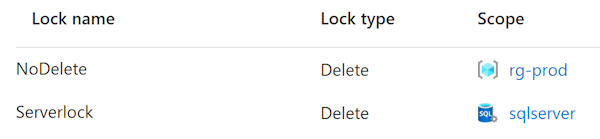
Even when the resource group scoped lock is deleted, it still protects the most critical resources from deletion (if your SQL server is gone, you lose all managed database backups as well).
Sometimes locks are problematic
Important to know is that locks apply to the control plane and not the data plane. This means you prevent users from deleting and/or modifying your actual resources (virtual machines, storage accounts, …) but not from the data that lives in these services.
This means you can delete actual rows in a database or files from blob storage, but deleting the complete database (on a server) is prevented. Same goes for other actions on the control plane like managing IP exceptions on a firewall.
This can be problematic and in some cases I’ve had the need to (temporarily) remove a resource lock on resource group level to tighten security on an actual resource (see the contraction).
Yet, this particular case could be a good example how it should be
I’ve been cleaning up quite some data the past few months, and I recently got greeted with the following message.
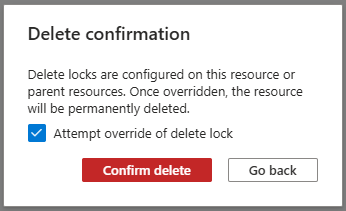
So rather than having to delete the resource lock before taking action, risking other parts being deleted as well, I can only delete the required container.
Note: The dialog clearly states ‘attempt’. This requires Owner or User Access Administrator rights.
Note: As far as I’m aware, this is a portal UX enhancement only and is not supported by ARM or other providers like Terraform (see Github).
In my opinion, this is a lot safer than my typical process described above, and I truely hope Microsoft will expand this behaviour to all resources.